
What the app does
Built for the people who worry.
Elderly parents, people living with dementia, children on school trips, pilgrims in large crowds. The band goes on their wrist. The app goes on yours.
Live map
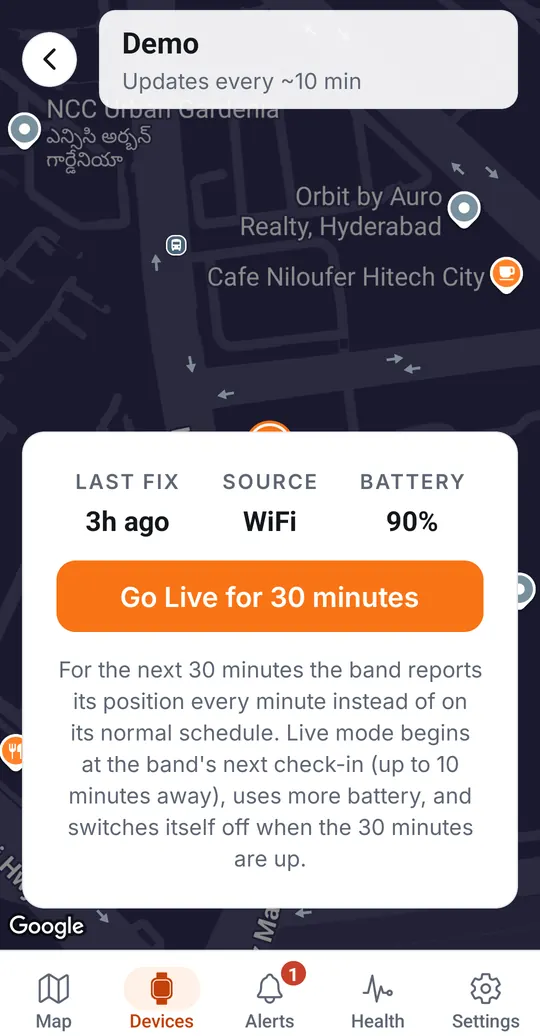
The wearer's latest position, how it was fixed (GPS, WiFi or cell) and when. Go Live for 30 minutes to get a position every minute.
Route history
Replay where they have been, with gaps shown as gaps rather than guessed.
SOS to everyone
A press of the band's button reaches every emergency contact by push notification and email at once.
Fall and band-removed alerts
The app tells you when the band raises a fall alert and the moment it leaves the wrist.
Safe zones
Draw an area around home, school or the care home and be told when the wearer leaves or returns.
Health at a glance
Heart rate, skin temperature, steps and sleep from bands that carry the sensors.
Family sharing
Invite relatives and carers to the same account so nobody is the single point of failure.
Never goes quiet unnoticed
Low battery and no-report warnings, so a band that has stopped reporting is flagged, not forgotten.
Alerts arrive by push notification and email today. WhatsApp and SMS follow once the operator approvals are in. Plans that unlock longer history and live tracking are sold on the pricing page, never inside the app, and SOS always works on the free plan.
Getting started
Five minutes, no pairing.
Install the app
Kavach Care, free on the App Store and Google Play.
Create your family account
Email and password, or sign in with Google. Add the phone numbers SOS should reach.
Scan the QR code on the box
The band is claimed to your account. No Bluetooth, no pairing: the band never connects to a phone.
Invite the family
Relatives and carers see the same map and get the same alerts.


Questions about the app
Is there a Kavach app?
Yes. The Kavach Care app is free on the App Store for iPhone and on Google Play for Android. It shows the band's live location, replays route history, receives SOS, fall, band-removed and safe-zone alerts, and shares all of it with the family. The wearer never needs the app: the band works on its own 4G connection.
Does the wearer need a phone or the app?
No. The band has its own SIM and reports over the mobile network. The app is for the family and carers who watch over the wearer. SOS reaches every emergency contact whether or not anyone has the app open.
Is the app free?
Yes. There is nothing to pay in the app and no advertising. Safety Plans that unlock longer history and live tracking are bought on this website, not inside the app, and SOS works on every plan including the free Basic plan.
How do I connect a band to the app?
Create an account, then scan the QR code printed on the band's box. The band is claimed to your family account and appears on the map at its next check-in, usually within ten minutes. There is no Bluetooth pairing: the band never connects to a phone.
Which phones does the app support?
iPhone on iOS 15.1 or later, and Android phones. It is available in India in English and Hindi, switchable in Settings.
How do I delete my account?
From the app, open Settings and tap Delete account. If you no longer have the app, use the account deletion page on this website and we complete it within 7 days.
See also the privacy policy and how to delete your account. Questions: support@ourkavach.com.